Connect to Open Catalog from Apache Spark
You can use any Iceberg REST-compatible engine to read and write to Open Catalog. This page describes how to use Spark to connect to Open Catalog.
When using Spark, you can choose the following methods to authenticate with Dremio:
- Dremio Personal Access Token (PAT)
- OAuth2 with an external identity provider (IdP)
You also need additional client-side work to enable Spark to properly authenticate with Dremio. These settings are discussed in the respective sections below.
Prerequisites
- Enable Dremio Personal Access Tokens (PATs).
- Configure Spark to use Iceberg 1.9+. If you can’t upgrade to 1.9, refer to the instructions on authenticating with Iceberg versions older than 1.9.
- Add the required libraries to the
spark-sqlcommand using the--packagesoption:- Iceberg Spark runtime, e.g.
iceberg-spark-runtime-4.0_2.13-1.10.1.jar(from Apache Iceberg releases) - Iceberg AWS S3 bundle, e.g.
iceberg-aws-bundle-1.10.1.jar(from Apache Iceberg releases). If you are using another object storage provider, change this to the appropriate bundle, e.g.iceberg-gcp-bundlefor Google Cloud Storage oriceberg-azure-bundlefor Azure Blob Storage. - The Dremio Auth Manager for Apache Iceberg library, e.g.
authmgr-oauth2-runtime-1.0.0.jar(from Dremio Auth Manager releases). This open-source library handles token exchange, automatically converting your personal access token (PAT) into an OAuth token for seamless authentication. For more details, see Introducing Dremio Auth Manager for Apache Iceberg.
- Iceberg Spark runtime, e.g.
Example:
Add required libraries to spark-sqlspark-sql --packages org.apache.iceberg:iceberg-spark-runtime-4.0_2.13:1.10.1,org.apache.iceberg:iceberg-aws-bundle:1.10.1,com.dremio.iceberg.authmgr:authmgr-oauth2-runtime:1.0.0
If you intend to use vended credentials, make sure to pass the following config to the spark-sql command. The X-Iceberg-Access-Delegation header instructs the catalog to provide temporary, scoped storage credentials so that Spark can access the underlying data files directly.
spark-sql ... --conf spark.sql.catalog.polaris.header.X-Iceberg-Access-Delegation=vended-credentials
Note: Ensure that the warehouse is set to default, as this is the warehouse used by Open Catalog.
Authenticating with Dremio Using Dremio PAT
Use this method if you want to use Spark with Dremio internal users. This method follows a two-step process:
Step 1: Create a Dremio PAT
Select a user that will be used to authenticate Spark jobs and create a Dremio PAT for that user. Then, use the section below to configure Spark to use PAT.
Step 2: Configure Spark to Use a Personal Access Token to Access Open Catalog
Below is an example Spark configuration that would allow Spark to connect to Open Catalog with Iceberg REST, using a Personal Access Token (PAT) for authentication:
Spark with PAT authenticationexport DREMIO_PAT=...
export DREMIO_ADDRESS=...
spark-sql \
--packages org.apache.iceberg:iceberg-spark-runtime-4.0_2.13:1.10.1,org.apache.iceberg:iceberg-aws-bundle:1.10.1,com.dremio.iceberg.authmgr:authmgr-oauth2-runtime:1.0.0 \
--conf spark.sql.extensions=org.apache.iceberg.spark.extensions.IcebergSparkSessionExtensions \
--conf spark.sql.catalog.polaris=org.apache.iceberg.spark.SparkCatalog \
--conf spark.sql.catalog.polaris.cache-enabled=false \
--conf spark.sql.catalog.polaris.type=rest \
--conf spark.sql.catalog.polaris.warehouse=default \
--conf spark.sql.catalog.polaris.uri=http://$DREMIO_ADDRESS:8181/api/catalog \
--conf spark.sql.catalog.polaris.header.X-Iceberg-Access-Delegation=vended-credentials \
--conf spark.sql.catalog.polaris.rest.auth.type=com.dremio.iceberg.authmgr.oauth2.OAuth2Manager \
--conf spark.sql.catalog.polaris.rest.auth.oauth2.token-endpoint=http://$DREMIO_ADDRESS:9047/oauth/token \
--conf spark.sql.catalog.polaris.rest.auth.oauth2.grant-type=urn:ietf:params:oauth:grant-type:token-exchange \
--conf spark.sql.catalog.polaris.rest.auth.oauth2.client-id=dremio \
--conf spark.sql.catalog.polaris.rest.auth.oauth2.client-auth=none \
--conf spark.sql.catalog.polaris.rest.auth.oauth2.scope=dremio.all \
--conf spark.sql.catalog.polaris.rest.auth.oauth2.token-exchange.subject-token="$DREMIO_PAT" \
--conf spark.sql.catalog.polaris.rest.auth.oauth2.token-exchange.subject-token-type=urn:ietf:params:oauth:token-type:dremio:personal-access-token
“dremio” as a Client ID is not used for actual authentication. It can be any string. DREMIO_PAT represents the Dremio Personal Access Token (PAT).
Authenticating with Dremio Using OAuth2 (External Identity Provider)
Use this method if you want to use Spark with users defined in an external identity provider, e.g., Keycloak.
Step 1: Configure Dremio to Use OAuth2 to Authenticate Spark
First, establish trust between Dremio and your identity provider. Go to Settings > External Token Providers, then add a new provider as shown below.
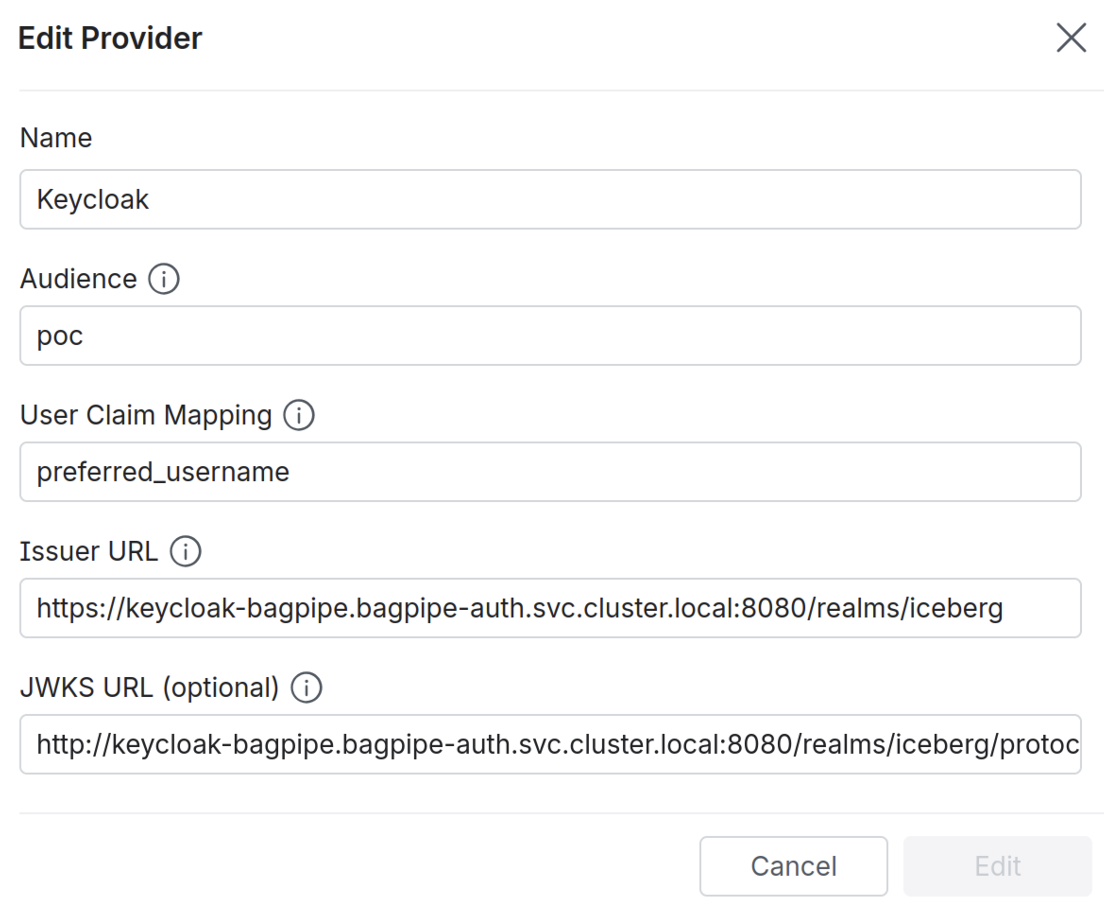
- The audience must match the
audclaim in the external JWT. - The value to set for “User Claim Mapping” depends on the IdP. It should point to the token claim that contains the value of the username that Dremio should use to map external users to internal users.
- “Issuer URL” should point to the root URL of the IdP that will be used to authenticate Spark clients.
- "JWKS URL" should point to the URL of the IdP's JWKS endpoint. If not provided, Dremio will retrieve it from
{issuerUrl}/.well-known/openid-configuration.
Step 2: Configure Spark to Use OAuth2
Below is an example of how you can use Spark to connect to Open Catalog, using an external IdP for user authentication. A summary of the process is below:
- Spark obtains a user-specific JSON Web Token (JWT) from an OAuth2 server (usually the IdP).
- Spark connects to Dremio and exchanges the JWT for a Dremio OAuth access token.
- Spark connects to Open Catalog using the Dremio OAuth access token.
export KEYCLOAK_ADDRESS=...
export DREMIO_ADDRESS=...
export CLIENT_SECRET=...

spark-sql \
    --packages org.apache.iceberg:iceberg-spark-runtime-4.0_2.13:1.10.1,org.apache.iceberg:iceberg-aws-bundle:1.10.1,com.dremio.iceberg.authmgr:authmgr-oauth2-runtime:1.0.0 \
    --conf spark.sql.extensions=org.apache.iceberg.spark.extensions.IcebergSparkSessionExtensions \
    --conf spark.sql.catalog.polaris=org.apache.iceberg.spark.SparkCatalog \
    --conf spark.sql.catalog.polaris.cache-enabled=false \
    --conf spark.sql.catalog.polaris.type=rest \
    --conf spark.sql.catalog.polaris.warehouse=default \
    --conf spark.sql.catalog.polaris.uri=http://$DREMIO_ADDRESS:8181/api/catalog \
    --conf spark.sql.catalog.polaris.header.X-Iceberg-Access-Delegation=vended-credentials \
    --conf spark.sql.catalog.polaris.rest.auth.type=com.dremio.iceberg.authmgr.oauth2.OAuth2Manager \
    --conf spark.sql.catalog.polaris.rest.auth.oauth2.issuer-url=http://$DREMIO_ADDRESS:9047/oauth/token \
    --conf spark.sql.catalog.polaris.rest.auth.oauth2.grant-type=urn:ietf:params:oauth:grant-type:token-exchange \
    --conf spark.sql.catalog.polaris.rest.auth.oauth2.scope=dremio.all \
    --conf spark.sql.catalog.polaris.rest.auth.oauth2.client-id=dremio \
    --conf spark.sql.catalog.polaris.rest.auth.oauth2.client-auth=none \
    --conf spark.sql.catalog.polaris.rest.auth.oauth2.token-exchange.subject-token.issuer-url=http://$KEYCLOAK_ADDRESS:8080/realms/iceberg \
    --conf spark.sql.catalog.polaris.rest.auth.oauth2.token-exchange.subject-token.grant-type=urn:ietf:params:oauth:grant-type:device_code \
    --conf spark.sql.catalog.polaris.rest.auth.oauth2.token-exchange.subject-token.scope=catalog \
    --conf spark.sql.catalog.polaris.rest.auth.oauth2.token-exchange.subject-token.client-id=dremio \
    --conf spark.sql.catalog.polaris.rest.auth.oauth2.token-exchange.subject-token.client-secret=$CLIENT_SECRET \
    --conf spark.sql.catalog.polaris.rest.auth.oauth2.token-exchange.subject-token-type=urn:ietf:params:oauth:token-type:jwt
- The main OAuth2 settings (
issuer-url,grant-type,scope,client-id) point to the Dremio token endpoint and configure the token exchange flow. - The
token-exchange.subject-token.*settings configure how the Dremio Auth Manager for Apache Iceberg obtains the subject token from the external IdP (Keycloak in this example). - The
dremioclient ID intoken-exchange.subject-token.client-idmust match a configured client in Keycloak. - The
catalogscope intoken-exchange.subject-token.scopemust match a configured scope in Keycloak.
Using Dremio PAT for Authentication with Iceberg Versions Older Than 1.9
If you are using a version of Iceberg older than 1.9, a custom step is required to run the OAuth2 token exchange flow against Dremio in order to obtain an access token, since versions of Iceberg below 1.9 do not include the Dremio Auth Manager for Apache Iceberg. Any OAuth2 client can be used for this. The below example uses curl for simplicity:
export DREMIO_PAT=...
export DREMIO_ADDRESS=...

curl -X POST https://$DREMIO_ADDRESS:9047/oauth/token -d "grant_type=urn:ietf:params:oauth:grant-type:token-exchange&scope=dremio.all&subject_token_type=urn:ietf:params:oauth:token-type:dremio:personal-access-token" --data-urlencode "subject_token=$DREMIO_PAT"
Extract the access token from the output of the token exchange flow. The below examples assume the token is stored in the $DREMIO_TOKEN variable.
- The token exchange output will also provide a token expiry period.
- It is also possible to obtain the access token via a custom IdP, but this is more challenging technically. Please contact Dremio for more information if this use case is required.
Configure Spark to Use an OAuth Token
Below is an example Spark configuration that would allow Spark to connect to Open Catalog with the Iceberg REST API, using an OAuth token for authentication:
Spark with OAuth token (Iceberg pre-1.9)export DREMIO_TOKEN=...
export DREMIO_ADDRESS=...
spark-sql \
--packages org.apache.iceberg:iceberg-spark-runtime-3.5_2.12:1.8.1 \
--conf spark.sql.extensions=org.apache.iceberg.spark.extensions.IcebergSparkSessionExtensions \
--conf spark.sql.catalog.polaris=org.apache.iceberg.spark.SparkCatalog \
--conf spark.sql.catalog.polaris.cache-enabled=false \
--conf spark.sql.catalog.polaris.type=rest \
--conf spark.sql.catalog.polaris.warehouse=default \
--conf spark.sql.catalog.polaris.uri=http://$DREMIO_ADDRESS:8181/api/catalog \
--conf spark.sql.catalog.polaris.token="$DREMIO_TOKEN"