External Token Providers
External token providers are OIDC identity providers that issue JSON Web Tokens (JWTs) when a user authenticates using an application client. After receiving a JWT from the external token provider, the client application uses Dremio token exchange to obtain an OAuth access token used to create connections to Dremio.
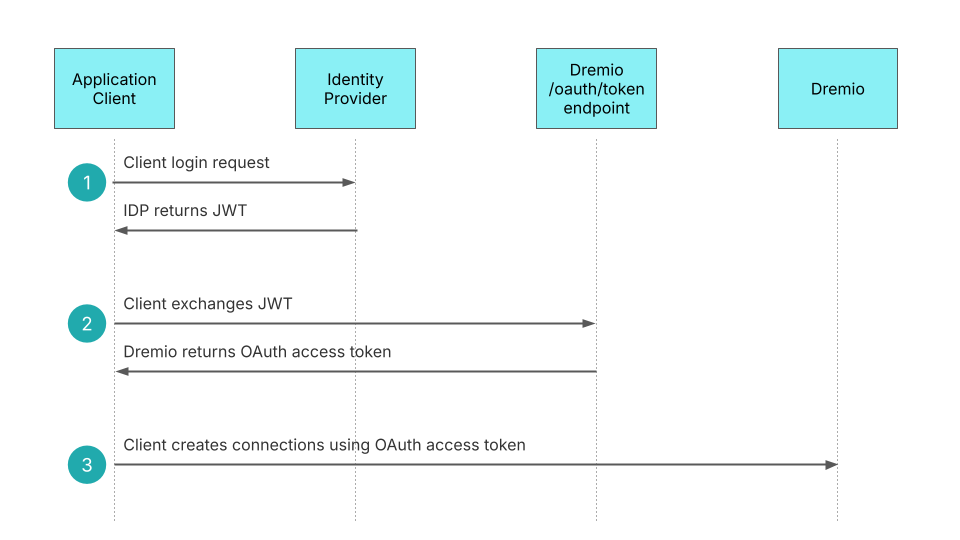
The OIDC external token provider does not need to be the same identity provider used by the Dremio console for single sign-on (SSO). The provider requires an application registration specifying the OAuth authorization flow to be used between the external token provider and the client to obtain the JWT that will be sent to Dremio.
This page outlines the steps for configuring an external token provider so Dremio can interpret and validate the JWTs issued by your provider.
The OIDC specification describes the content of the JWT and the authorization process. Claims in a JWT contain information asserted about a subject. They are key/value pairs in which the key is a string, and the value can be any JSON type (a string, a number, a boolean, an array, or a JSON object).
Example: External JWT Claims from Microsoft Entra ID{
"aud": "0853fce0-c748-4c54-aa58-f5b9af279840",
"iss": "https://login.microsoftonline.com/3e334762-b0c6-4c36-9faf-93800f0d6c71/v2.0",
"upn": "[email protected]"
}
Prerequisites
Before setting up External Token Providers, ensure you have:
- Dremio admin privileges or the CONFIGURE SECURITY privilege.
- An OIDC-compliant Identity Provider configured with an application registration for your client.
- Access to the following information from your IDP:
- Audience – Application ID or resource URI
- User claim mapping – The claim containing the Dremio username
- Issuer URL – Identity provider identification
- JWKS URL – Optional location of public keys
Define an External Token Provider
Dremio requires the following configuration values from your OIDC identity provider.
The examples below are specific to Microsoft Entra ID. Your identity provider may require additional configuration of a client application registration that depends on the OAuth authorization flow used between your client and your provider. To configure your application registration, consult your identity provider documentation.
Audience
The audience value identifies the intended recipients of the external JWT. It can generally be an array of case-sensitive strings or URI values. The audience is contained in the aud claim in the external JWT.
When using Microsoft Entra ID, the audience can be the Application ID assigned to your app in the Microsoft Entra ID portal or the resource URI. In v2.0 tokens, this value is always the Application ID. In v1.0 tokens, it can be the Application ID or the resource URI used in the request, depending on how the client requested the token. Dremio supports v1.0 and v2.0 JWTs from Microsoft Entra ID.
Example Audience Claim with Microsoft Entra ID Application ID"aud": "0853fce0-c748-4c54-aa58-f5b9af279840"
User Claim Mapping
The user claim mapping identifies the claim in the external JWT that contains the Dremio username.
When using Microsoft Entra ID authentication, Dremio usernames must align with the User Principal Name (UPN) claim for correct linking of user group memberships via the Azure Graph Client.
When a user is added to a Power BI workspace, the user's identity is also represented by the User Principal Name (UPN), which has the format of an email address.
The JWT contains the UPN claim, named upn, and its value.
"upn": "[email protected]"
The user claim mapping field of the external token provider requires the name of the claim used in the JWT, which in this case is upn.
Issuer URL
The issuer URL identifies the identity provider that issued the JWT. It is contained in the external JWT's iss claim. When using Microsoft Entra ID, the issuer claim includes the Microsoft Entra ID tenant identifier. Only one external token provider in the system should use the combination of a given audience and issuer.
"iss": "https://login.microsoftonline.com/3e334762-b0c6-4c36-9faf-93800f0d6c71/v2.0"
JWKS URL
The JWKS URL is an endpoint that hosts the JWK Set (JWKS), a set of public keys used for verifying the JWT signature. This value is optional; if you do not provide a JWKS URL value when configuring the external token provider, Dremio retrieves the JWKS URL from {issuer URL}/.well-known/openid-configuration.
For Microsoft Entra ID, the JWKS URL is typically of the form https://login.microsoftonline.com/{tenant_id}/discovery/v2.0/keys.
https://login.microsoftonline.com/58a43618-7933-4e0d-906e-1c1a2a867ad6/discovery/v2.0/keys
Manage External Token Providers
The Dremio administrator or a user with the CONFIGURE SECURITY privilege can view and manage external token providers in Dremio.
View External Token Providers
To view external token providers:
- In the Dremio console, click
 in the side navigation bar and select Organization.
 - Select External Token Providers from the organization settings sidebar. The External Token Providers page lists the external token providers configured for Dremio.
Add an External Token Provider
To add an external token provider:
- In the Dremio console, click in the side navigation bar and select Organization.
- Select External Token Providers from the organization settings sidebar.
- Click Add Provider at the top-right corner of the External Token Providers page.
- In the Add Provider dialog, complete the configuration using the fields described in Define an External Token Provider.
- Click Add.
When you add an external token provider, Dremio automatically enables it. To deactivate it, toggle the Enabled switch on the External Token Providers page.
Each external token provider must use a different combination of issuer and audience. If multiple external token providers share the same issuer and audience, authentication will fail regardless of whether the token providers are enabled.
Edit an External Token Provider
To edit an external token provider:
- In the Dremio console, click in the side navigation bar and select Organization.
- Select External Token Providers from the organization settings sidebar.
- On the External Token Providers page, find the row for the external token provider you want to edit and click
 at the right side of the row.
 - In the Edit Provider dialog, update the values using the fields described in Define an External Token Provider.
- Click Save.
Delete an External Token Provider
To delete an external token provider:
- In the Dremio console, click in the side navigation bar and select Organization.
- Select External Token Providers from the organization settings sidebar.
- On the External Token Providers page, find the row for the external token provider you want to delete and click
 at the right side of the row.
 - In the Delete External Provider dialog, click Delete.
Use the External Token Provider
Retrieve an External JWT
This sample application uses the Microsoft Authentication Library to authenticate a user with the OAuth authorization code flow.
client_idis the Application (Client) ID assigned to your app by Microsoft Entra ID when the app was registered.app_redirect_urlor reply URL is the location of the client app where Microsoft Entra ID sends an external JWT after the user has successfully logged in, such ashttps://myapp.com/auth/callbackorhttp://localhost:3000/auth/callback. The redirect URI is defined in the Microsoft Entra ID application registration for the client.dremio_scope_nameis the API scope you defined for the client in the Microsoft Entra ID application profile. Dremio requires a scope ofdremio.allin token exchange, regardless of the scope configured in the application registration.tenant_idis your Microsoft Entra ID tenant identifier.
import msal

client_id = "TODO"
app_redirect_url = "TODO"
dremio_scope_name = "TODO"
tenant_id = "TODO"

authority_url = "https://login.microsoftonline.com/" + tenant_id
app = msal.PublicClientApplication(client_id, authority=authority_url)
auth_code_flow = app.initiate_auth_code_flow(
    scopes=[dremio_scope_name],
    redirect_uri=app_redirect_url
)  # PKCE is included in the MSAL Python library

state = auth_code_flow['state']

authorization_code = "TODO: retrieved from the browser"

external_access_token = ""

if authorization_code:
    auth_result = app.acquire_token_by_auth_code_flow(
        auth_code_flow=auth_code_flow,
        auth_response={"code": authorization_code, "state": state}
    )
    if "access_token" in auth_result:
        external_access_token = auth_result["access_token"]
    else:
        print("Error: no access token")
    if "refresh_token" in auth_result:
        refresh_token = auth_result["refresh_token"]
    else:
        print("Error: no refresh token")
else:
    print("Error: no auth code")
Exchange a JWT
The client must use the Dremio /oauth/token REST API to exchange the JWT for an OAuth access token.