Concurrency in Iceberg Tables
Dremio supports running most combinations of concurrent SQL commands on Iceberg tables. To take a few examples, two INSERT commands can run concurrently on the same table, as can two SELECT commands, or an UPDATE and an ALTER command.
However, Apache Iceberg’s Serializable Isolation level with non-locking table semantics can result in scenarios in which write collisions occur. In these circumstances, the SQL command that finishes second fails with an error. Such failures occur only for a subset of combinations of two SQL commands running concurrently on a single Iceberg table.
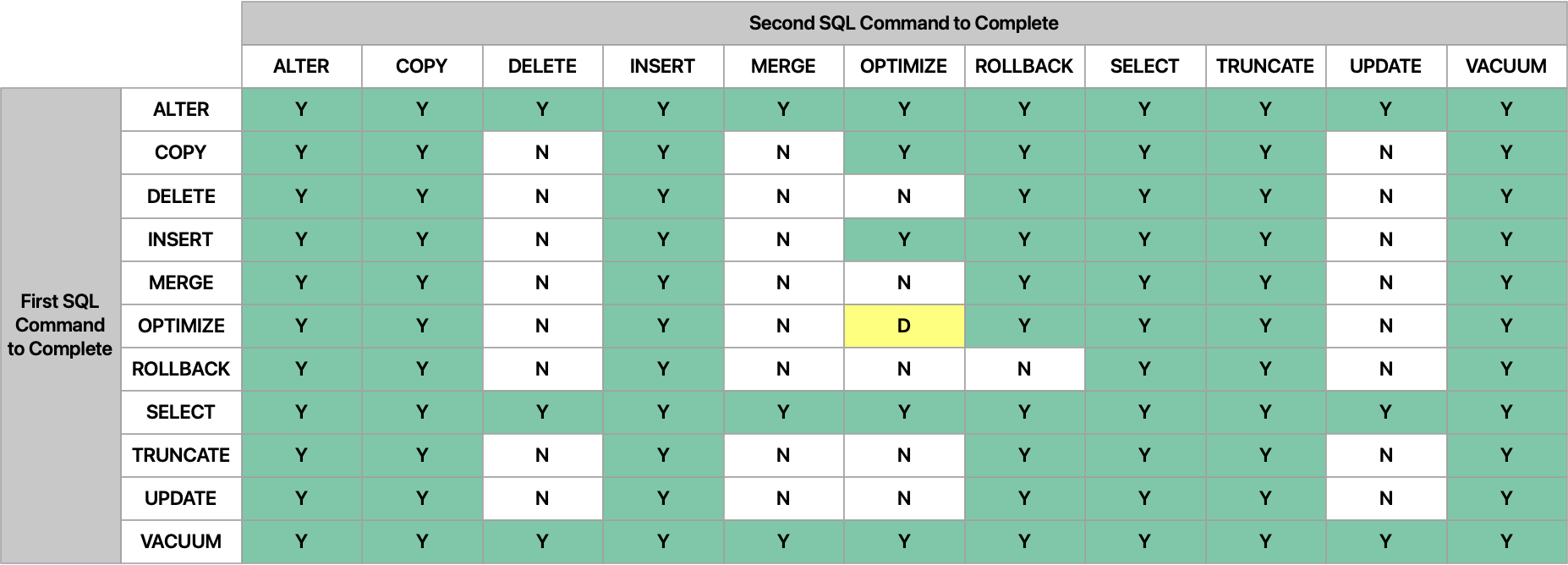
This table shows which types of SQL commands can and cannot run concurrently with other types on a single Iceberg table:
- Y: Running these two types of commands concurrently is supported. However, a "Y" combination can still fail with a concurrent modification error under heavy write load. See Reduce Concurrency Errors.
- N: Running these two types of commands concurrently is not supported. The second command to complete fails with an error.
- D: Running two OPTIMIZE commands concurrently is supported if they run against different table partitions.
Understand Optimistic Concurrency and Commit Retries
Apache Iceberg tables use an optimistic concurrency control model: every write reads the current table metadata, builds a new snapshot, and then attempts to atomically swap it in as the new current snapshot. If another commit has already changed the table in the meantime, that swap fails and the commit must be retried against the latest metadata.
This means that even commands marked "Y" in the table above can fail with a concurrent modification error. For example, two INSERT commands can run at the same time, but only one of them can win each individual commit attempt. Dremio retries a losing commit automatically, so most "Y" combinations succeed without you noticing any conflict. However, if commits collide repeatedly, for example under heavy concurrent write load, the retrying command can exhaust its retry budget and fail with a concurrent modification error.
Reduce Concurrency Errors
For combinations of commands that are conflict-free by semantics, you can reduce the rate of concurrency errors by increasing the number of times Iceberg retries a failed commit before giving up. For example, two INSERT commands never conflict on the data being written. This behavior is controlled by the commit.retry.num-retries table property.
Consider increasing this value when supported concurrent write workloads, such as parallel INSERT, DELETE, UPDATE, or MERGE jobs, regularly fail with concurrent modification errors after the default retries are exhausted and there are no semantic conflicts.
To increase the retry count for a table, run:
Increase commit retry count for a tableALTER TABLE tbl SET TBLPROPERTIES ('commit.retry.num-retries' = '20');
Related retry properties, such as commit.retry.min-wait-ms, commit.retry.max-wait-ms, and commit.retry.total-timeout-ms, can also be tuned to control how long and how aggressively Iceberg retries a commit. See Iceberg table properties for the full list of properties and their defaults.
Increasing retries helps only when the commands do not modify the same data. When commands modify the same data, such as two concurrent UPDATE commands on the same row, Iceberg cannot reconcile the conflicting changes. Command combinations marked "N" in the table above will always fail on the second commit regardless of retry settings.